Contrast agent deployment
Deploy inside runtime, monitor without source code changes.

Contrast agents are deployed inside the application’s runtime environment, without impacting the application or API source code. There are two methods to deploy the Contrast agent that can be executed at an individual level or at scale (via automation tools, cloud orchestration tools, etc.) depending upon an organization’s needs and goals:
- Flex Agent
- Direct installation of Contrast agent
Similar to how other tools, such as Application Performance Monitoring (APM) technologies, leverage agents to detect and diagnose performance problems, the Contrast runtime security platform embeds sensors directly into the application runtime. However, instead of monitoring for performance, Contrast’s sensors are purpose-built for security. They pinpoint the exact exploitable lines of code within applications and APIs and provide full, actionable context, including data and logic flows. This instrumentation attaches monitoring code to the application as it runs, all without altering the original source code files, providing deep, real-time security visibility from the inside out.
Agent deployment
- Instead of requiring developers to insert security checks into their code, Contrast agents are deployed alongside the application.
- This involves configuring the application's runtime environment (e.g., JVM for Java, .NET CLR for .NET, Python interpreter for Python) to load the Contrast agent.
Instrumentation
- The agent "instruments" the application. which attaches "sensors" or method calls (function call or procedure call) within the application's execution.
- These sensors passively monitor the behavior of the application as it runs.
- The method calls are part of the agent's code, not the developer's application code.
Proven to run at scale
Contrast's lightweight agents instrument applications to provide the most accurate runtime data. Trusted by many of the world's largest organizations, these agents are proven to run at scale across all environments, from development to production, with near-zero performance impact. To make deployment a smooth and seamless experience, Contrast provides flexible options like the Flex Agent, which simplifies installation across multiple languages.
Flex Agent
The Flex Agent is a single package that you install and configure independent of what language your application is in. This is available in Linux OS only.
Key benefits
- Language-agnostic simplicity: Easily deploy and update agents across Java, .NET, Python, PHP and Node.js.
- Auto-updates, always on: Stay secure without manual intervention. As an option, the Flex Agent can be setup to ensure your agents are always on the latest version.
- Accelerated ROI: Faster setup, fewer interruptions and continuous coverage mean security pays off faster.
Deployment process
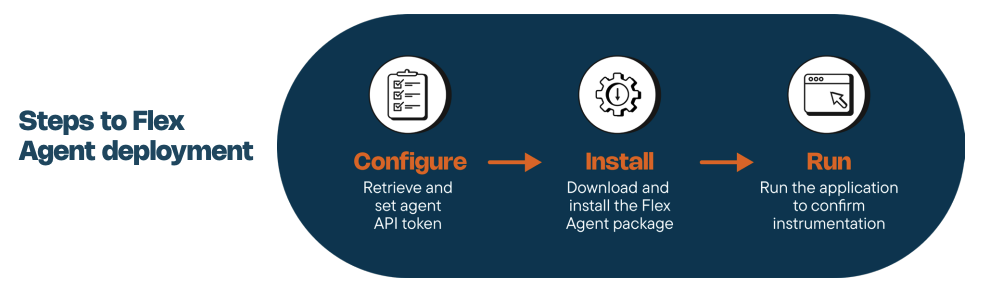
Contrast's Flex Agent is designed for simple security — you install one small package on your machine, and that's it. The Flex Agent then automatically detects all your running applications and, based on the programming language they're using, attaches the right Contrast agent to them with zero configuration required.
Direct install of the Contrast agent
Users may choose to have greater control over the agent installation process and manually select the appropriate agent based on the language and deployment method of the application in question.
Key benefits
- Tighter control: Provides the ability to utilize additional configuration options such as enabling more granular tuning of the agent's behavior by setting the level of analysis/instrumentation performed by the agent.
- Additional language support: This option covers additional languages (e.g. Go) not available via the Flex Agent and provides an alternative install option if needed.
- Deployment flexibility: In addition to Linux OS, the agents can also be deployed on Mac and Windows.
Deployment process
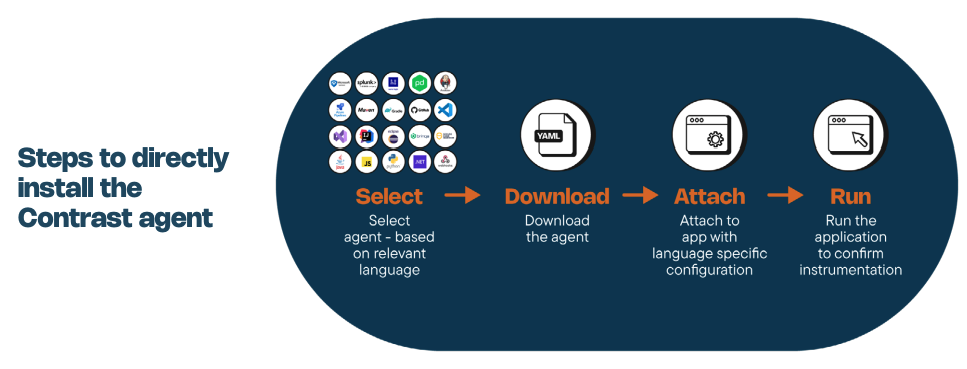
There are many options to deploy the Contrast agent based on a user’s unique environment. However, the process always follows the same basic steps:
- Select agent based on language and deployment of app
- Download the agent and contrast_security.yaml configuration file
- Configure the app to use agent and the agent to use the configuration file
- Test/Use the application/API as you normally would
Experience Contrast today
Ready to see the Contrast runtime security platform in action?

You can't stop what you can't see
Schedule a demo and see how to eliminate your application-layer blind spots.
Book a demo