
X
October 30, 2025
When we introduced the Contrast Model-Context Protocol (MCP) Server a few months ago (read Supercharge your vulnerability remediation with Contrast MCP), the promise was clear: to give AI agents access to the rich security context within the Contrast Graph, which is a real-time application security data model that continuously maps, updates and correlates security insights across applications, APIs and infrastructure.
Since launch, the response has been incredible. Development teams are already leveraging this integration to power advanced AI agents, leading to rapid vulnerability remediation, smarter code analysis, and a fundamental shift toward truly AI-assisted secure development.
As a quick refresher, the MCP Server is the crucial bridge that gives your Large Language Model (LLM) agent the tools it needs to securely interact with the Contrast Security API and access the data in your Contrast Graph.
In this post, we’ll move past the introduction to highlight real customer use cases, and then provide the full quick-start guide to setting up the Contrast MCP Server in your own environment.
Here are a few high-value use cases our early adopters are implementing:
This is the most impactful use case. When a vulnerability is found, the AI agent doesn't just see a line of insecure code. Because of the MCP Server, the agent can access the full security context from Contrast, including:
The AI agent uses this complete picture, not just the code snippet, to generate a precise, context-aware fix or a secure code refactor, drastically reducing the time required for a human to step in and improving the accuracy of the AI coding assistant.
Here are example prompts that you can use with your AI coding assistant:
Instead of manually pulling data from different dashboards, an AI agent, connected via the MCP Server, can quickly query the Contrast Graph to generate comprehensive security reports tailored for any audience.
The AI can perform complex analysis on the fly, such as:
This capability automates security intelligence and reporting, freeing up security teams to focus on mitigation.
Example report-building prompt:
As a CISO, I want to present the Contrast data for this project to business people. Build me an HTML report that uses nice graphs and pictures to display a simple, but comprehensive picture of the security position of this application, what would happen if this were running on the public internet, and what are the chances and timeframe of exposure, and what could be lost.
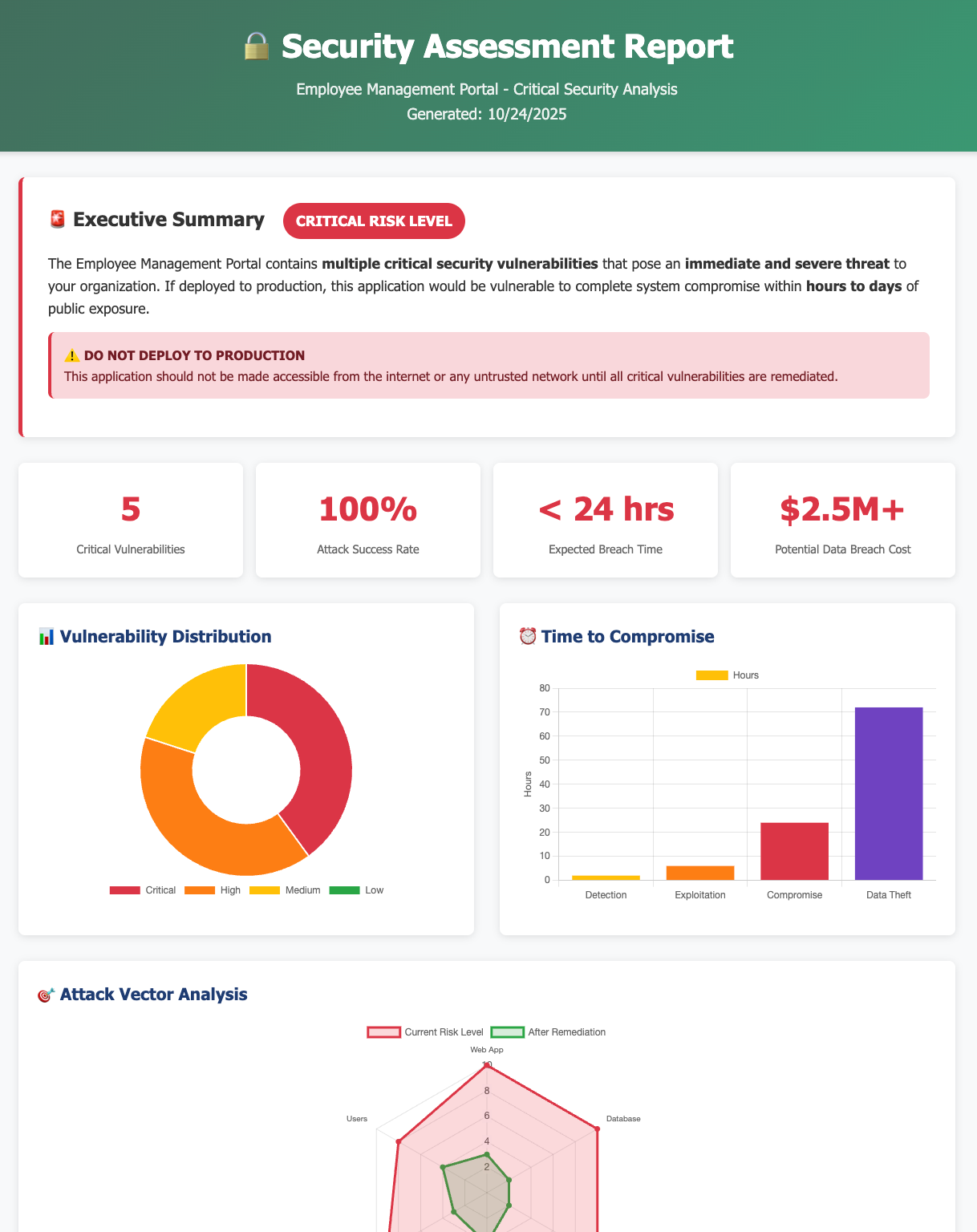
Generate custom reports with the Contrast MCP Server from data in the Contrast Graph.
Inspired by these advanced use cases? Here’s how you can set up the Contrast MCP Server in your own environment to start powering your AI agent.
It is imperative to note here, though, that exposing your Contrast vulnerability data via an MCP Server to an LLM that trains on your data is dangerous. You must use an enterprise-grade, "sandboxed" LLM that guarantees your data is not used for further training. Examples include models targeted to the enterprise market, like those available through AWS Bedrock or those used for GitHub Copilot and Claude Code.
It is your responsibility to thoroughly research and validate your specific LLM provider's data usage and security policy before deploying the Contrast MCP Server.
The first step is setting up the Contrast MCP Server on your local machine. Refer to the documentation at https://github.com/Contrast-Security-OSS/mcp-contrast to find the most appropriate setup method for your IDE or project.
Here is a concrete example for a popular setup. For all others, check the official documentation first!
Install the Contrast MCP Server in Visual Studio Code with Docker from this installation link.
Alternatively, download the latest JAR and configure the Contrast MCP Server manually:
Last, Enable the Tool in Copilot:
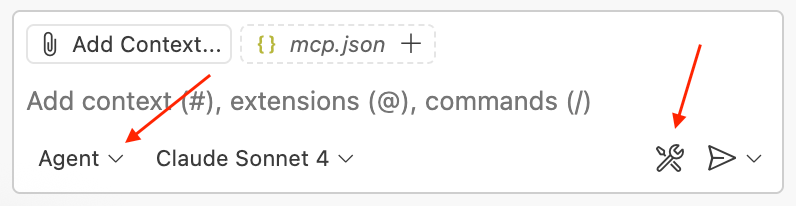
Put Copilot in Agent mode and click the tools icon
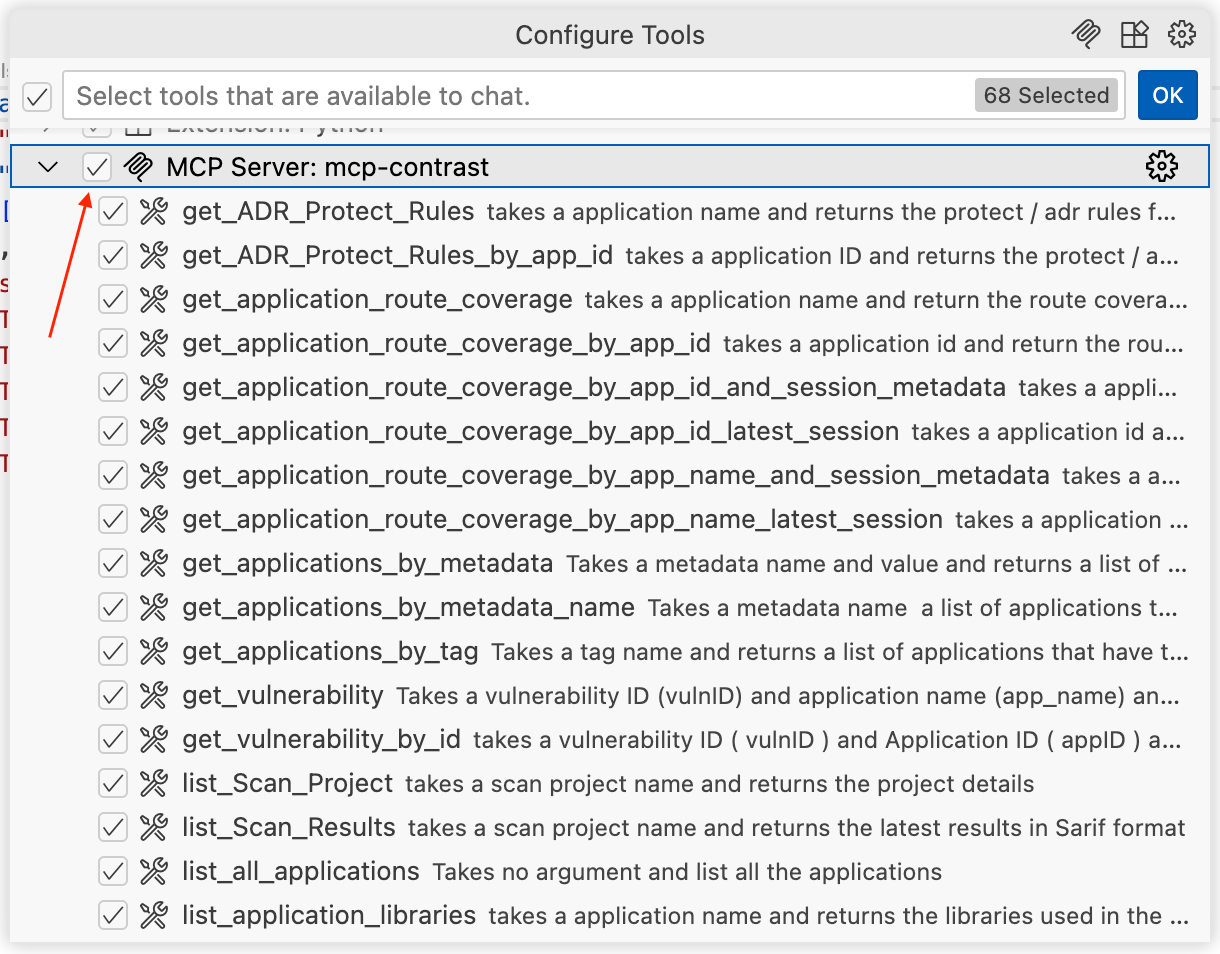
Enable the Contrast MCP Server in the tools dialog
Now that the Contrast MCP Server is installed and enabled in your environment, your AI agents can finally use the data in the Contrast Graph to generate actionable security intelligence.
We will continue to share new and exciting use cases as the technology matures. Set up the Contrast MCP Server today and begin turning your security insights into immediate, powerful intelligence for your AI development workflow.

Jacob Mages-Haskins is a Principal Software Engineer at Contrast Security, where he leads innovation in AI-driven cybersecurity. With decades of experience building software across higher education, HVAC manufacturing, telemedicine, live events, and fintech, Jacob brings a uniquely broad perspective to the next generation of application-layer protection. He originally conceived the Contrast Security Model-Context Protocol (MCP) Server, a flexible platform that connects large language models (LLMs) to Contrast’s deep runtime security and application intelligence data. Today, Jacob contributes to the SmartFix AI initiative, developing autonomous agents that detect and remediate vulnerabilities in real time, empowering developers with enterprise-grade application security. Driven by curiosity more than credentials, Jacob is passionate about the intersection of AI, software engineering, and cybersecurity innovation. When he’s not pushing the boundaries of secure development, you’ll find him reading, gardening, or exploring the rugged coastline and trails of Maine.


